
Lock after inactivity
Set an idle period and let IdleLock secure the Windows session when input stops.
- Detects keyboard and mouse activity
- Configurable idle threshold
- Uses the normal Windows lock screen
Automatic workstation locking for Windows
Automatically lock unattended Windows workstations after a configurable period of inactivity, keep a local event trail, and put configuration in administrators' hands.
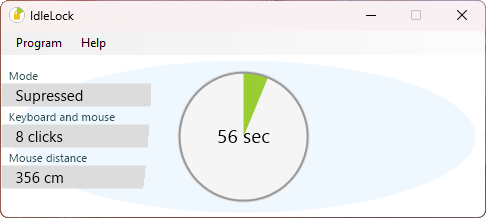
A simple safeguard
IdleLock adds a focused, configurable control for environments where an unlocked computer can create an avoidable security or policy risk.
Set an idle period and let IdleLock secure the Windows session when input stops.
Record relevant IdleLock events locally for troubleshooting and policy review.
Configure the application manually or apply repeatable registry-based settings.
Private by design
Keyboard and mouse input is used only to decide whether the computer is idle. IdleLock does not record what a user types, capture mouse movements, send telemetry, or report activity to an online service.
How it works
There is no account, portal, or remote service between the workstation and its lock policy. Once configured, IdleLock handles the process locally.
Try first, license when ready
Test the real product in your environment before discussing a license. The trial keeps the locking and configuration features available while making its trial status clear.
Fully functional trial
Use the normal IdleLock functionality for as long as you need to assess it.
Licensed use
Tell us about your intended use and the number of workstations you need to protect.
Installation and configuration
Choose the installer that suits the way you work, then configure IdleLock through its interface or with registry settings.
A familiar interactive setup for installing and testing IdleLock on an individual PC.
A standard Windows Installer package for administrators preparing a managed rollout.
Use the Options menu directly or prepare a registry file for repeatable settings.
Small and self-contained
IdleLock is a compact Windows desktop application built for .NET Framework 4.8. It does not need a permanent service, online account, or internet connection.
Good to know
IdleLock detects local keyboard and mouse activity only to determine whether the workstation is active or idle. It does not record keystrokes, mouse movements, or the content you work with.
No. IdleLock works entirely on the Windows computer on which it is installed. An internet connection is not required for normal use.
No. IdleLock has no automatic update checks, telemetry, or report-back behavior. Configuration and event information remain local to the computer.
The trial does not limit IdleLock features or stop working after a fixed number of days. It displays a red trial notice, shows the main window after sign-in, and may bring that window back periodically while the trial is in use.
Yes. Access to the settings can be limited to administrators, helping prevent ordinary users from changing the configured idle-lock policy.
A single computer can be configured through the Options menu. For repeatable deployment, the same settings can also be supplied through a Windows registry file.
The EXE is convenient for an individual, interactive installation. The MSI package is the better starting point for administrators preparing a managed deployment.
IdleLock can help enforce and document an idle-locking requirement, but compliance depends on your complete technical and organizational controls. Your organization remains responsible for assessing the applicable standard or policy.
Pricing is provided on request. Contact InSpace Software with the number of computers and your intended use so we can discuss an appropriate license.
Evaluate it on a real workstation
Download the trial for Windows, or contact us to discuss pricing and deployment.